


Revisar la cobertura de la garantía y las opciones de reparación
Verificar los términos, estado, opciones de reparación y fecha de vencimiento de la garantía estándar limitada de su producto, además de confirmar la compra de una extensión o actualización de los servicios de garantía de Toshiba. Nota: solamente aplica para televisores, computadoras y Tablets.
Nota: se aplica a televisores, computadoras y tabletas solamente. Para todos los demás productos ver la sección de abajo titulada Standard Limited documentos de garantía de Toshiba
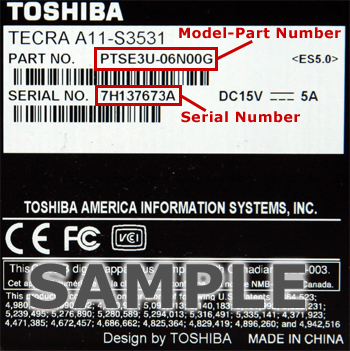
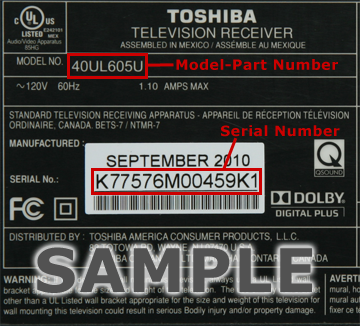
Número de serie
Número de modelo:

- For computers click here..
- For tablets click here
- For televisions click here
X
X
Garantía Estándar Limitada y Programas de Servicio:
Registration for this product cannot be completed.
If the information entered is correct, please select the link below. Otherwise correct the information and resubmit.
Click here to go to our quick and easy online Warranty Resolution Center.
If the information entered is correct, please select the link below. Otherwise correct the information and resubmit.
Click here to go to our quick and easy online Warranty Resolution Center.
Documentos de la Garantía estándar limitada de Toshiba
Ver documentos actuales de la Garantía estándar limitada de Toshiba »
The Standard Limited Warranty documents listed here contain the most recent revisions.
If you're looking for the previous revisions, please click here.
Computers, Tablets, and dynaEdge™ AR Smart Glasses
 One (1) Year Standard Limited Warranty (English) (Published Sep 26, 2023)
One (1) Year Standard Limited Warranty (Spanish) Published Aug 12, 2019)
One (1) Year Standard Limited Warranty (Spanish) (Published Sep 26, 2023)
Two (2) Year Standard Limited Warranty (Spanish) (Published Aug 12, 2019)
Three (3) Year Standard Limited Warranty (English) (Published Sep 26, 2023)
Three (3) Year Standard Limited Warranty (Spanish) (Published Aug 12, 2019)
Four(4) Year Standard Limited Warranty (English) (Published Sep 26, 2023)
Four (4) Year Standard Limited Warranty (Spanish) (Published Aug 12, 2019)
Five (5) Year Standard Limited Warranty (English) (Published Sep 26, 2023)
Five (5) Year Standard Limited Warranty (Spanish) (Published Aug 12, 2019)
Canada 3 Years Standard Limited International Warranty (English, French) (Published Nov 1, 2022)
Hard Drives and Storage (portable external hard drives, desktop external hard drives, internal storage, flash storage, wireless storage)
One Year Storage Products Limited Warranty (English, French, Portugese, Spanish) (Published Dec 10, 2015)
Two Year Storage Products Limited Warranty (English, French, Portugese, Spanish) (Published Dec 10, 2015)
Three Year Storage Products Limited Warranty (English, French, Portugese, Spanish) (Published Dec 10, 2015)
Five Year Storage Products Limited Warranty (English, French, Portugese, Spanish) (Published Dec 10, 2015)
Digital Displays
Three Year Digital Display Limited Warranty (English) (Published Jun 23, 2015)
Accessories, and Electronics (camcorders, AC adapters, mice, keyboards, etc.)
One Year Accessories and Electronics Limited Warranty (English & Spanish) (Published Sep 26, 2023)
Two Year Accessories and Electronics Limited Warranty (English/Spanish) (Published Feb 4, 2015)
Three Year Accessories and Electronics Limited Warranty (English/Spanish) (Published Feb 4, 2015)
Five Year Accessories and Electronics Limited Warranty (English/Spanish) (Published Aug 29, 2012)
Canada 1 Year Accessory Standard Limited Warranty (English, French) (Published Nov 1, 2022)
expert care support
Support Terms & Conditions (Published Apr 15, 2019)
Computers, Tablets, and dynaEdge™ AR Smart Glasses
One (1) Year Standard Limited Warranty (English) (Published Sep 26, 2023)
One (1) Year Standard Limited Warranty (Spanish) Published Aug 12, 2019)
One (1) Year Standard Limited Warranty (Spanish) (Published Sep 26, 2023)
Two (2) Year Standard Limited Warranty (Spanish) (Published Aug 12, 2019)
Three (3) Year Standard Limited Warranty (English) (Published Sep 26, 2023)
Three (3) Year Standard Limited Warranty (Spanish) (Published Aug 12, 2019)
Four(4) Year Standard Limited Warranty (English) (Published Sep 26, 2023)
Four (4) Year Standard Limited Warranty (Spanish) (Published Aug 12, 2019)
Five (5) Year Standard Limited Warranty (English) (Published Sep 26, 2023)
Five (5) Year Standard Limited Warranty (Spanish) (Published Aug 12, 2019)
Canada 3 Years Standard Limited International Warranty (English, French) (Published Nov 1, 2022)
Hard Drives and Storage (portable external hard drives, desktop external hard drives, internal storage, flash storage, wireless storage)
One Year Storage Products Limited Warranty (English, French, Portugese, Spanish) (Published Dec 10, 2015)
Two Year Storage Products Limited Warranty (English, French, Portugese, Spanish) (Published Dec 10, 2015)
Three Year Storage Products Limited Warranty (English, French, Portugese, Spanish) (Published Dec 10, 2015)
Five Year Storage Products Limited Warranty (English, French, Portugese, Spanish) (Published Dec 10, 2015)
Digital Displays
Three Year Digital Display Limited Warranty (English) (Published Jun 23, 2015)
Accessories, and Electronics (camcorders, AC adapters, mice, keyboards, etc.)
One Year Accessories and Electronics Limited Warranty (English & Spanish) (Published Sep 26, 2023)
Two Year Accessories and Electronics Limited Warranty (English/Spanish) (Published Feb 4, 2015)
Three Year Accessories and Electronics Limited Warranty (English/Spanish) (Published Feb 4, 2015)
Five Year Accessories and Electronics Limited Warranty (English/Spanish) (Published Aug 29, 2012)
Canada 1 Year Accessory Standard Limited Warranty (English, French) (Published Nov 1, 2022)
expert care support
Support Terms & Conditions (Published Apr 15, 2019)
Ver documentos archivados de la Garantía estándar limitada de Toshiba »
The Standard Limited Warranty documents listed here are no longer the current ones, though one of them may be applicable to your Toshiba product. If you're looking for the most recent versions, please click here..
Computers, Tablets, and dynaEdge™ AR Smart Glasses
One (1) Year Standard Limited Warranty (English) (Published Apr 4, 2012)
One (1) Year Standard Limited Warranty (English) (Published Oct 19, 2018)
One (1) Year Standard Limited Warranty (English) (Published Aug 9, 2019)
One (1) Year Standard Limited Warranty (English) (Published Oct 11, 2019)
One (1) Year Standard Limited Warranty for Mini-Notebooks (Published May 28, 2010)
One (1) Year Standard Limited Warranty for Computers (Published Apr 6, 2011)
One (1) Year Standard Limited Warranty for Computers (Published May 28, 2010)
One (1) Year Standard Limited Warranty (Spanish) (Published Apr 4, 2012)
One (1) Year Standard Limited Warranty (Spanish) (Published Oct 1, 2015)
One (1) Year Standard Limited Warranty for computers with no operating system (Spanish) (Published Sep 20, 2012)
Two (2) Year Standard Limited Warranty (English) (Published Apr 4, 2012)
Two (2) Year Standard Limited Warranty (English) (Published Aug 9, 2019)
Two (2) Year Standard Limited Warranty (English) (Published Oct 11, 2019)
Two(2) Year Standard Limited Warranty for Computers (Published Aug 4, 2011)
Two(2) Year Standard Limited Warranty for Computers (Published Apr 6, 2011)
Two(2) Year Standard Limited Warranty for Computers (Published May 28, 2010)
Two (2) Year Standard Limited Warranty (Spanish) (Published Apr 4, 2012)
Three (3) Year Standard Limited Warranty (English) (Published Apr 4, 2012)
Three (3) Year Standard Limited Warranty (English) (Published Oct 19, 2018)
Three (3) Year Standard Limited Warranty (English) (Published Aug 9, 2019)
Three (3) Year Standard Limited Warranty (English) (Published Oct 11, 2019)
Three (3) Year Standard Limited Warranty for Computers (Published Aug 4, 2011)
Three (3) Year Standard Limited Warranty for Computers (Published Apr 6, 2011)
Three (3) Year Standard Limited Warranty for Computers (Published May 28, 2010)
Three (3) Year Standard Limited Warranty (Spanish) (Published Apr 4, 2012)
Three (3) Year Standard Limited Warranty (Spanish) (Published Oct 1, 2015)
Four (4) Year Standard Limited Warranty (Published Apr 4, 2012)
Four (4) Year Standard Limited Warranty (English) (Published Oct 19, 2018)
Four(4) Year Standard Limited Warranty (English) (Published Aug 9, 2019)
Four(4) Year Standard Limited Warranty (English) (Published Oct 11, 2019)
Four (4) Year Standard Limited Warranty for Computers (Published Aug 4, 2011)
Four (4) Year Standard Limited Warranty for Computers (Published Apr 6, 2011)
Four (4) Year Standard Limited Warranty for Computers (Published May 28, 2010)
Four (4) Year Standard Limited Warranty (Spanish) (Published Oct 1, 2015)
Five (5) Year Standard Limited Warranty (Published Apr 4, 2012)
Five (5) Year Standard Limited Warranty (English) (Published Oct 19, 2018)
Five (5) Year Standard Limited Warranty (English) (Published Aug 9, 2019)
Five (5) Year Standard Limited Warranty (English) (Published Oct 11, 2019)
Ninety (90) Day Standard Limited Warranty (Spanish) (Published Apr 4, 2012)
Canada 3 Years Standard Limited International Warranty (English, French) (Published Apr 23, 2009)
Televisions
One (1) Year Standard Limited Warranty for Televisions (Published Dec 1, 2011)
One (1) Year Standard Limited Warranty for Televisions (Published Feb 21, 2013)
Three (3) Year Standard Limited Warranty for Televisions (Published Sep 15, 2014)
Hard Drives and Storage (portable external hard drives, desktop external hard drives, internal storage, flash storage, wireless storage)
One Year Storage Products Limited Warranty (English & Spanish) (Published Apr 10, 2015)
One Year Storage Products Limited Warranty (English, Spanish, Portugese) (Published May 20, 2015)
Two Year Storage Products Limited Warranty (English & Spanish) (Published Apr 10, 2015)
Two Year Storage Products Limited Warranty (English, Spanish, Portugese) (Published May 20, 2015)
Three Year Storage Products Limited Warranty (English & Spanish) (Published Apr 10, 2015)
Five Year Storage Products Limited Warranty (English & Spanish) (Published Apr 10, 2015)
Three Year Storage Products Limited Warranty (English, Spanish, Portugese) (Published May 20, 2015)
Five Year Storage Products Limited Warranty (English, Spanish, Portugese) (Published May 20, 2015)
Accessories, and Electronics (camcorders, AC adapters, mice, keyboards, etc.)
One Year Accessories and Electronics Limited Warranty (English & Spanish) (Published Feb 24, 2015)
One Year Accessories and Electronics Limited Warranty (Published May 28, 2010)
Two Year Accessories and Electronics Limited Warranty (Published Feb 6, 2012)
Two Year Accessories and Electronics Limited Warranty (Published Apr 10, 2014)
Three Year Accessories and Electronics Limited Warranty (Published Oct 25, 2011)
Three Year Accessories and Electronics Limited Warranty (Published May 28, 2010)
Three Year Accessories and Electronics Limited Warranty (Published May 28, 2010)
Canada 3 Years LCD Monitor Standard Limited Warranty (English) (Published Aug 26, 2008)
Canada 3 Years LCD Monitor Standard Limited Warranty (French) (Published Aug 26, 2008)
Canada 1 Year Accessory Standard Limited Warranty (English, French) (Published Feb 24, 2011)
expert care support
Support Terms & Conditions (Published Jul 20, 2012)
Support Terms & Conditions (Published Aug 22, 2012)
Support Terms & Conditions (Published Dec 5, 2012)
Support Terms & Conditions (Published Apr 11, 2013)
Support Terms & Conditions (Published Aug 13, 2014)
Digital Audio Visual Products (DVD, Blu-ray, DVR, etc.)
Ninety (90) Day Standard Limited Warranty for Digital Audio Video Products (Published Dec 20, 2011)
Ninety (90) Day Standard Limited Warranty for Symbio™ Media Box and Blu-ray Disc™ Player (Published Apr 8, 2013)
Canada 3 years Media Box Standard Limited Warranty (English, French) (Published Jul 24, 2013)
Projectors
One (1) Year Standard Limited Warranty (Published Feb 5, 2009)
Two(2) Year Standard Limited Warranty (Published Mar 26, 2008)
Two(2) Year Standard Limited Warranty for Projectors (Published Jun 6, 2007)
Three (3) Year Standard Limited Warranty (Published Mar 20, 2008)
Three (3) Year Standard Limited Warranty for Projectors (Published Jun 6, 2007)
Canada 3 Years Projector Standard Limited Warranty (English, French) (Published Jun 11, 2009)
Ninety (90) Day Encore Projector Standard Limited Warranty (Published Mar 26, 2008)
Ninety (90) Day Encore Projector Standard Limited Warranty (Published Jun 6, 2007)
Computers, Tablets, and dynaEdge™ AR Smart Glasses
One (1) Year Standard Limited Warranty (English) (Published Apr 4, 2012)
One (1) Year Standard Limited Warranty (English) (Published Oct 19, 2018)
One (1) Year Standard Limited Warranty (English) (Published Aug 9, 2019)
One (1) Year Standard Limited Warranty (English) (Published Oct 11, 2019)
One (1) Year Standard Limited Warranty for Mini-Notebooks (Published May 28, 2010)
One (1) Year Standard Limited Warranty for Computers (Published Apr 6, 2011)
One (1) Year Standard Limited Warranty for Computers (Published May 28, 2010)
One (1) Year Standard Limited Warranty (Spanish) (Published Apr 4, 2012)
One (1) Year Standard Limited Warranty (Spanish) (Published Oct 1, 2015)
One (1) Year Standard Limited Warranty for computers with no operating system (Spanish) (Published Sep 20, 2012)
Two (2) Year Standard Limited Warranty (English) (Published Apr 4, 2012)
Two (2) Year Standard Limited Warranty (English) (Published Aug 9, 2019)
Two (2) Year Standard Limited Warranty (English) (Published Oct 11, 2019)
Two(2) Year Standard Limited Warranty for Computers (Published Aug 4, 2011)
Two(2) Year Standard Limited Warranty for Computers (Published Apr 6, 2011)
Two(2) Year Standard Limited Warranty for Computers (Published May 28, 2010)
Two (2) Year Standard Limited Warranty (Spanish) (Published Apr 4, 2012)
Three (3) Year Standard Limited Warranty (English) (Published Apr 4, 2012)
Three (3) Year Standard Limited Warranty (English) (Published Oct 19, 2018)
Three (3) Year Standard Limited Warranty (English) (Published Aug 9, 2019)
Three (3) Year Standard Limited Warranty (English) (Published Oct 11, 2019)
Three (3) Year Standard Limited Warranty for Computers (Published Aug 4, 2011)
Three (3) Year Standard Limited Warranty for Computers (Published Apr 6, 2011)
Three (3) Year Standard Limited Warranty for Computers (Published May 28, 2010)
Three (3) Year Standard Limited Warranty (Spanish) (Published Apr 4, 2012)
Three (3) Year Standard Limited Warranty (Spanish) (Published Oct 1, 2015)
Four (4) Year Standard Limited Warranty (Published Apr 4, 2012)
Four (4) Year Standard Limited Warranty (English) (Published Oct 19, 2018)
Four(4) Year Standard Limited Warranty (English) (Published Aug 9, 2019)
Four(4) Year Standard Limited Warranty (English) (Published Oct 11, 2019)
Four (4) Year Standard Limited Warranty for Computers (Published Aug 4, 2011)
Four (4) Year Standard Limited Warranty for Computers (Published Apr 6, 2011)
Four (4) Year Standard Limited Warranty for Computers (Published May 28, 2010)
Four (4) Year Standard Limited Warranty (Spanish) (Published Oct 1, 2015)
Five (5) Year Standard Limited Warranty (Published Apr 4, 2012)
Five (5) Year Standard Limited Warranty (English) (Published Oct 19, 2018)
Five (5) Year Standard Limited Warranty (English) (Published Aug 9, 2019)
Five (5) Year Standard Limited Warranty (English) (Published Oct 11, 2019)
Ninety (90) Day Standard Limited Warranty (Spanish) (Published Apr 4, 2012)
Canada 3 Years Standard Limited International Warranty (English, French) (Published Apr 23, 2009)
Televisions
One (1) Year Standard Limited Warranty for Televisions (Published Dec 1, 2011)
One (1) Year Standard Limited Warranty for Televisions (Published Feb 21, 2013)
Three (3) Year Standard Limited Warranty for Televisions (Published Sep 15, 2014)
Hard Drives and Storage (portable external hard drives, desktop external hard drives, internal storage, flash storage, wireless storage)
One Year Storage Products Limited Warranty (English & Spanish) (Published Apr 10, 2015)
One Year Storage Products Limited Warranty (English, Spanish, Portugese) (Published May 20, 2015)
Two Year Storage Products Limited Warranty (English & Spanish) (Published Apr 10, 2015)
Two Year Storage Products Limited Warranty (English, Spanish, Portugese) (Published May 20, 2015)
Three Year Storage Products Limited Warranty (English & Spanish) (Published Apr 10, 2015)
Five Year Storage Products Limited Warranty (English & Spanish) (Published Apr 10, 2015)
Three Year Storage Products Limited Warranty (English, Spanish, Portugese) (Published May 20, 2015)
Five Year Storage Products Limited Warranty (English, Spanish, Portugese) (Published May 20, 2015)
Accessories, and Electronics (camcorders, AC adapters, mice, keyboards, etc.)
One Year Accessories and Electronics Limited Warranty (English & Spanish) (Published Feb 24, 2015)
One Year Accessories and Electronics Limited Warranty (Published May 28, 2010)
Two Year Accessories and Electronics Limited Warranty (Published Feb 6, 2012)
Two Year Accessories and Electronics Limited Warranty (Published Apr 10, 2014)
Three Year Accessories and Electronics Limited Warranty (Published Oct 25, 2011)
Three Year Accessories and Electronics Limited Warranty (Published May 28, 2010)
Three Year Accessories and Electronics Limited Warranty (Published May 28, 2010)
Canada 3 Years LCD Monitor Standard Limited Warranty (English) (Published Aug 26, 2008)
Canada 3 Years LCD Monitor Standard Limited Warranty (French) (Published Aug 26, 2008)
Canada 1 Year Accessory Standard Limited Warranty (English, French) (Published Feb 24, 2011)
expert care support
Support Terms & Conditions (Published Jul 20, 2012)
Support Terms & Conditions (Published Aug 22, 2012)
Support Terms & Conditions (Published Dec 5, 2012)
Support Terms & Conditions (Published Apr 11, 2013)
Support Terms & Conditions (Published Aug 13, 2014)
Digital Audio Visual Products (DVD, Blu-ray, DVR, etc.)
Ninety (90) Day Standard Limited Warranty for Digital Audio Video Products (Published Dec 20, 2011)
Ninety (90) Day Standard Limited Warranty for Symbio™ Media Box and Blu-ray Disc™ Player (Published Apr 8, 2013)
Canada 3 years Media Box Standard Limited Warranty (English, French) (Published Jul 24, 2013)
Projectors
One (1) Year Standard Limited Warranty (Published Feb 5, 2009)
Two(2) Year Standard Limited Warranty (Published Mar 26, 2008)
Two(2) Year Standard Limited Warranty for Projectors (Published Jun 6, 2007)
Three (3) Year Standard Limited Warranty (Published Mar 20, 2008)
Three (3) Year Standard Limited Warranty for Projectors (Published Jun 6, 2007)
Canada 3 Years Projector Standard Limited Warranty (English, French) (Published Jun 11, 2009)
Ninety (90) Day Encore Projector Standard Limited Warranty (Published Mar 26, 2008)
Ninety (90) Day Encore Projector Standard Limited Warranty (Published Jun 6, 2007)